
What are extension groups for?
When an extension uses the option*8 to intercept calls, it will only be able to intercept incoming calls from extensions within the same extension group.
Extension groups characteristics
- An extension can only be on one group.
- If an extension is not in any grupo, it can intercept calls from any group.
How can I request the group assignment for my extensions?
Send us an email with a list of your extensions and the group you want them assigned to. Attached you will find an excel with an example titled "Machote Grupos".
Does it have an extra cost?
No
Where do I get a listing of all my extensions?
You can request your list sending us an email to soporte@playtelecom.com or you can follow the instructions below:
- Go to your billing portal, enter Bill type: FIJO (landline) and download the detail file.
- Add a filter on the first row of the document clicking on the button Filter and Organize (Ctrl + Shift + L). As shown in the image below.
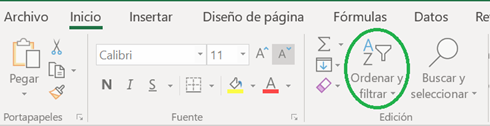
Image 1: Option to add a filter.
3. At column L choose only the option "Extension SIP"
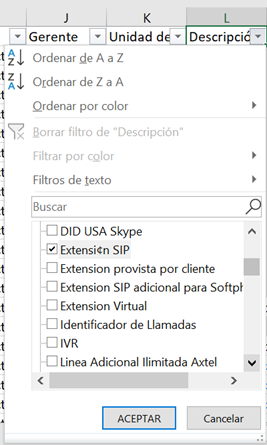
Image 2: Filter at columna L
4. Copy columns C and D ( This are the phone numbers and user names of each extension).
5. Open the document attached to this manual, called "Extensiones" and paste the information form step 4 on the first 2 columns of teh excel document. Authomaticaly an extension number will apear at column C.
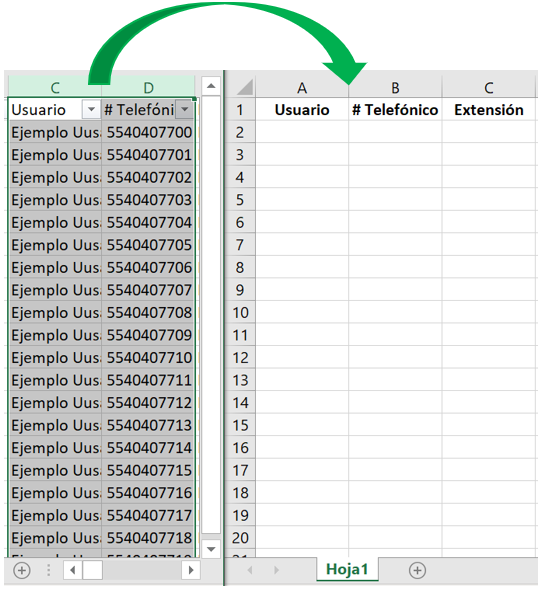
Image 3: Call Detail document and "Extensiones" document.
Request an extension group here!
Comments
0 comments
Please sign in to leave a comment.